LaTeX, publications and `tikz`
Today’s’ experience with helping to submit an article for a journal of Taylor & Francis group was educative and energy draining at the same time.
Yesterday was quite a long day dedicated to styling the document, while now I had only figures to worry about.
Later, I’ll definitely have to write some guide about academic writing and how R software, which can be useful in this aspect.
But now lets speak about some useful tips in using tikz.
In RMarkdown there are several options on how to integrate tikz graphics into a document.
When generating a LaTeX output, the simplest way is to embed the LaTeX code inside the document.
While working with other formats, the only solutions is to use tikz environment provided by RMarkdown.
`` `{tikz, fig.cap = "Figure", fig.align = "center"}
*Latex code here*
`` `
In order to be able to use this environment one will need to have magick and pdftools R packages installed.
The first one depending on magick++ library1, while the second requires libpoppler files to run2.
But this is not the topic for today.
On the first place among today’s discoveries that are worth mentioning we have the possibility to place the nodes on drawn lines.
Here is a simplified example of the resulting figure:
% Loading dependencies
\usetikzlibrary{
  positioning,
  arrows.meta
}

% Main picture
\begin{tikzpicture}
  [
    % Boxes
    box/.style = {
      rectangle,
      draw = black,
      rounded corners,
      minimum height = {3em},
      align = left
    },
    % Circles
    circ/.style = {
      circle,
      draw = black,
      fill = white,
      minimum size = {3em},
      thin,
      align = center
    },
    % Arrow line
    arrowl/.style = {
      -{stealth},
      very thick
    },
    % Text nodes (separate from boxes)
    textn/.style = {
      align = left
    },
    % Node distances
    node distance=5mm and 2mm
  ]

  % Draw curved line with circles on it
  \draw[arrowl] (0,4) .. controls (1,2) .. (0,0)
    node[pos=0.3, circ] (a) {1}
    node[pos=0.7, circ] (b) {2}
  ;

  % First rectangle frame
  \node[box, right=of a, minimum width={50mm}] (a1) {};
    % Text inside the frame
    \node[right, align=left] at (a1.west) {
      \textbf{Header 1}\\
      Some text
    };

  % Second frame
  \node[box, right=of b, minimum width={50mm}] (b1) {};
    \node[right, align=left] at (b1.west) {
      \textbf{Header 2}\\
      Some more text
    };

  % Drawing supporting lines
  \draw[-Butt Cap,line width=5pt] (a)--(a1);
  \draw[-Butt Cap,line width=5pt] (b)--(b1);
\end{tikzpicture}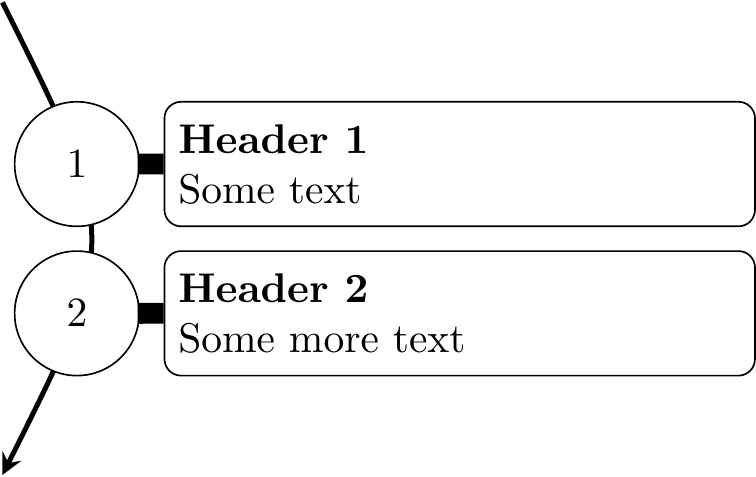
Figure 1: Nodes anchored on a curved line
Another interesting point is the embedding of drawing arrows with intermediate anchoring point, uniting several segment into a chain. This option makes it possible to draw complex arrows with multiple turning points.
% Loading dependencies
\usetikzlibrary{
  positioning,
  fit, calc,
  arrows.meta
}

% Main picture
\begin{tikzpicture}
  [
    % Main box style
    box/.style = {
      rectangle,
      draw = black,
      rounded corners,
      inner sep = {3pt},
      minimum width = {width("Subframe title:")+2pt},
      minimum height = {3em},
      align = left
    },
    % Empty box for empty space
    emptybox/.style = {
      rectangle,
      draw = white,
      text width = {width("Subframe title:")+2pt},
      minimum height = {3em},
      align = center
    },
    % Arrow style
    arrowc/.style = {
      -{stealth},
      very thick,
      rounded corners = 5pt
    },
    node distance=1mm and 10mm
  ]

  % First node group
  %% Header
  \node[emptybox] (a) {\textbf{Title 1}};
  %% Subframes
  \node[box, below=of a] (b) {
    Subframe title:\\
    \texttt{h1ozghkcj4}
  };
  \node[box, below=of b] (c) {
    Subframe title:\\
    \texttt{2fnwnc5hy0}
  };
  %% Group frame
  \node[box, fit=(a)(c), inner sep=1mm] (ac) {};

  % Second node group
  %% Header
  \node[emptybox, right=of a] (a1) {\textbf{Title 1}};
  %% Subframes
  \node[box, right=of b] (b1) {
    Subframe title:\\
    \texttt{2fnwnc5hy0}
  };
  \node[emptybox, right=of c] (c1) {};
  %% Group frame
  \node[box, fit=(a1)(c1), inner sep=1mm] (ac1) {};

  % Arrow
  \draw[arrowc]
    %% Start at
    (c.west)
    %% First segment
    -| ($ (c.south west) - (5mm,3mm) $)
    %% Second segment
    -- ($ (c1.south west) - (5mm,3mm) $)
    %% Third segment
    |- (b1.west)
  ;
\end{tikzpicture}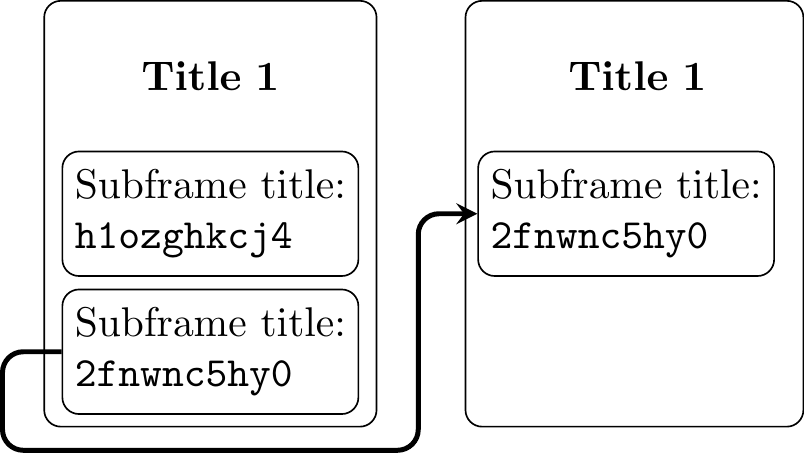
Figure 2: Multi-segment arrow example
Finally, this experience was not only useful for learning some new tikz tricks, but for working with tables as well.
For example, I believe everyone knows that it’s possible to embed itemized lists inside tabularx environment.
However, it is possible to do the same thing with usual tabular environment as well!
Unfortunately, to show this example I’ll need to find a solution on how to easily include TeX generated output inside html document with the possibility to add supplementary LaTeX packages.